Never Built a Mobile App? Now We Can!
Vibe Coding vs AI Assissted Development
TL;DR:
This post walks through my story to build a shower meter mobile app using coding AI Agents and sharing what I learned along the way.
👉 The app is open sourced. If you first want to try the app, feel free to skip straight to the end.
👉 Recently I publisehd a blog post here for the PWA version so you can follow up on this there.
A couple of times in my life, I tried to start developing a mobile app, but I always failed. I thought I knew Java, so what could stop me from building an Android app? But setting up Android Studio on my old laptop, going through lots of learning material, and hoping it might get easier in the future were some of the reasons I stopped halfway through.
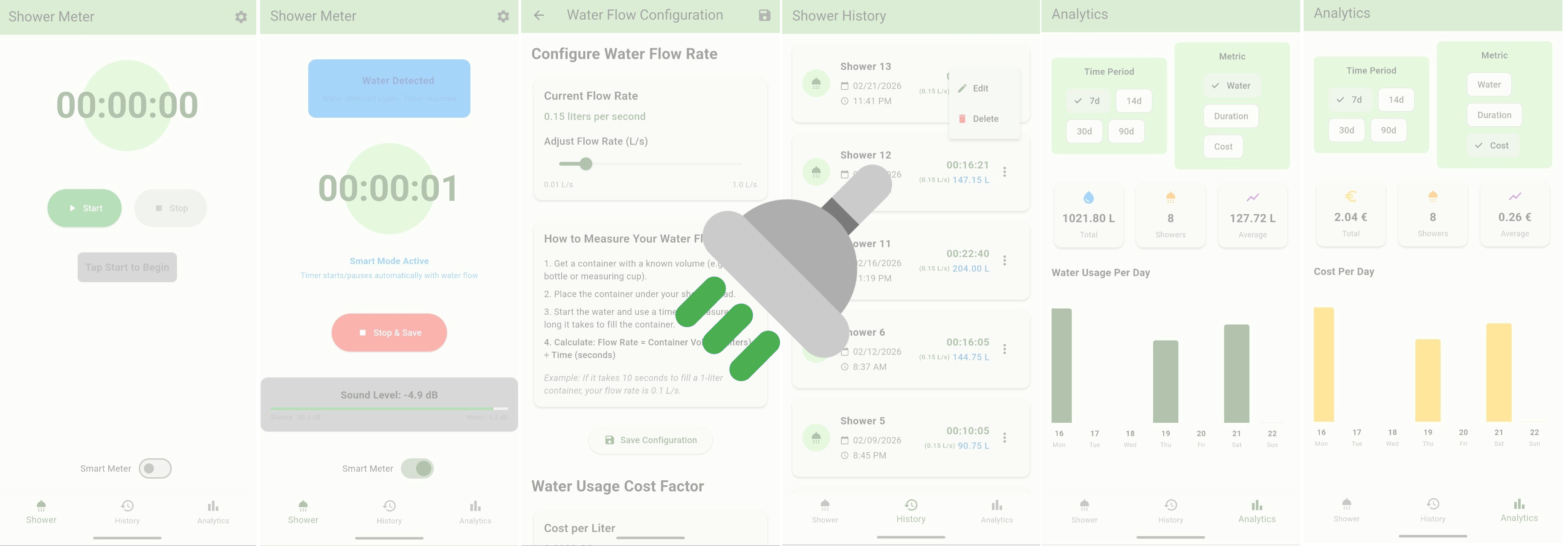
Now, after years of advances in AI-assisted development, I started wondering: maybe this is my chance. When a simple app idea came to mind (Smart Shower Meter), I said to myself, now is the time to experience vibe coding in a territory where I have no clue... mobile app development!
But...
Will I learn anything if I just do vibe coding?
Will the outcome be useful and maintainable?
Should I choose assisted development instead and learn along the way?
How realistic is that?
Below, I want to share my experience… come with me!
Problem Statement
For a long time, I’ve wondered whether my shower time is too long and if I could make it shorter. Obviously, the first step was to measure it, to understand the current state and track whether I was actually improving, and by how much.
Solution Space
At first, I considered building/buying an IoT device for accurate measurement, but that felt costly and like overengineering.
Then I thought about writing a Garmin app and using my smartwatch. That sounded plausible, but it would mean wearing my watch all the time.
A simple mobile app seemed like a better option. However, if I had to touch it with wet hands to pause the timer, that was a deal-breaker. So I thought: what if I used the microphone to make a “smart” app that automatically pauses when the water tap is turned off?
I started searching on Google Play… surprisingly, no results. Perfect!
Initial Setup
I wanted to do everything for free. Since we’re still living in the golden age where powerful AI tools are freely accessible, I wanted to leverage that opportunity before it’s gone.
I mainly used the free version of GitHub Copilot Agent (which currently uses Claude Haiku 4.5, GPT-4.1, GPT-4o, GPT-5 mini, and Raptor mini; almost randomly) in VS Code, and sometimes the free, non-signed-in version of ChatGPT for more general questions and guidance.
Soon, I realized that to build something quickly and cross-platform, the Flutter framework (based on the Dart language) was the right choice, something I had absolutely no clue about, which made it perfect for this experiment.
Experience
Trying to build an app in a new language using AI agents is fun, but why not turn it into a learning opportunity? Instead of just accepting the results, I started questioning them and trying to understand the output by quickly reviewing the code.
I wanted to keep my brain awake and active; otherwise, the learning aspect would be lost. Finally, I managed to build the first MVP (Minimum Viable Product) in two days, though it consumed all of my Copilot free usage.
Below, I’m listing some learnings and tips so that next time we can do it more efficiently.
Bonus: I also documented one of the prompting experiences and related issues in more detail in this PR.
Tips
It's better to always create a new chat flow sooner rather than later… the agent's performance easily reduces due to the larger irrelevant context window, which biases the agent's output!
Never allow automatic command execution!
- Several times, I noticed the agent was about to execute nonsensical commands, so it's better to never allow it automatically, or you'll end up in situations that require more work to clean up the mess.
Edit commands before allowing them.
- Don't forget you can edit the commands, so do it when they're wrong.
Check the changes to see how meaningful they are.
- At least have a quick review of the changes before approving. By reverting the wrong changes, I could save some time.
Don't forget to add tests, but instruct the agent to create meaningful tests based on your final logic (not just more meaningless ones)!
Clearly specify which files might need changes. It can assist the agent, though it's not always necessary.
Consider the solution before instructing, and only let the agent handle the syntax and code details that you don't need to know in depth but can easily test.
Search and try to understand any new concept you encounter to keep learning and avoid accepting things without question!
Points when you are a developer
Naturally, you know what to ask even in a new language and framework, like a designer who doesn’t need to know a new tool by heart.
I could easily set up CI/CD and improve project quality, which is a common requirement that every developer should ask for (I hope so).
You know if the agent has changed something in the test setup, you need to change the workflows!
The agent could easily be confused handling the closing brackets of a large component it has built and couldn’t fix it in a few iterations, but for me as a developer, it was a quick fix!
- I mean, of course, bigger models might be able to fix it, but just a comparison to give a point to myself :)
Challenges with flutter
In some cases, it wasn’t fully cross-platform and needed special care for each platform, which even confused the agent, like when using the microphone output or storing data locally.
Improving the design in the specific way I want might be a bit challenging, so for now, I'm sticking more to the framework standards.
The developer tool in the browser doesn’t work out of the box.
- There is a specific dev tool see here

Surprises
- I thought auto-detecting water would be the most challenging part, but aside from getting the mic to work on all platforms, the math was quite simple and effective without any advanced ML or frequency analysis. Just checking for average dB with some basic math was sufficient.
Caution
Never share any personal data with AI agents.
Don’t use the free models for confidential or private code; they are best for public code.
Did I Learn Anything?
Well... yes and no: I learned Flutter's basics, project structure, and some of the cons and pros. I didn't learn the details of the possibilities and fundamentals of Flutter and its design system. But now I know what is missing, and maybe next time I will start by using AI or better materials to first learn the basics and fundamentals and then begin AI-assisted development using AI agents.
Try it Out!
Now, if you're like me and interested in measuring everything, and want to try out this shower meter, feel free to give it a try:
How to use it (which I hope the app is intuitive enough 😉)
Next
👉 Recently I publisehd a blog post here for the PWA version so you can follow up on this there.
About the author
- Cognitive Scientists | Senior Developer | Into Product Management | Interested in AI Ethics | Sharing my experiences and personal insights as a human in the tech world.
Comments
Join the discussionNo comments yet. Be the first to comment.